Understanding the Two Types of Two-Factor Authentication (2FA) on the Social Platform
Last updated: April 9, 2026
When working with the Social Platform and Sales Navigator, it’s important to understand that the Social Platform actually uses two different types of authentication. They look similar, but work in completely different ways and affect the way you connect to the platform.
This guide explains both types in simple terms so you know what to expect and how it impacts your experience with the system.
1. Basic Two-Factor Authentication (Standard Social 2FA)
This is the regular two-factor authentication that the Social Platform offers to protect your account.
You receive a code by email, SMS, or are prompted to use an authenticator app (Google Authenticator, Microsoft Authenticator, etc.) This type of 2FA protects your Social login.
Key point: This is the Social Platform’s own 2FA. You manage it inside your Social settings and log in using an authenticator app.
2. Sales Navigator Single Sign-On (SN SSO)
Sales Navigator SSO is a separate login system, usually used by companies with an Enterprise Sales Navigator subscription. It is not part of your Social login. Instead, it is controlled by your company’s IT team.
Companies may use providers such as:
Okta
Microsoft Entra ID (Azure AD)
Microsoft Whitelabel
Bloomberg
etc.
Currently, we only support logging in via Microsoft and Microsoft Whitelabels.
What it affects: Sales Navigator SSO does not block your Social login. Our system can log in to your Social Account as usual.
❗However:
Your Sales Navigator access will be locked until you complete the SSO login.
The SSO login uses your corporate account, not your Social Account.
The credentials must be provided by your company’s Sales Navigator administrator.
Key point: This is not the usual Social 2FA. This is a corporate login required for Sales Navigator only.
How This Impacts the Platform
Basic 2FA
The system can log in if you provide the verification code.
All features, including Sales Navigator, will work normally afterward.
Sales Navigator SSO
The system can log into your Social Account.
Sales Navigator features will not work until the SSO login is completed.
Only your corporate Sales Navigator admin can provide the correct SSO credentials.
How You Can Resolve SSO Issues
If you see a notification like:
"Sales Navigator subscription is required"
"Two-Step Verification Required"
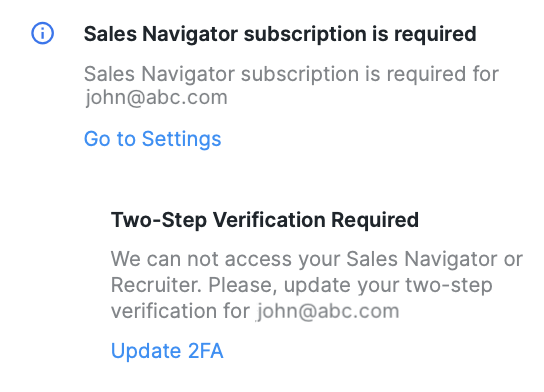
Then you need to:
Contact your company’s Sales Navigator administrator (IT or SalesOps).
Ask them for the SSO login credentials used for Sales Navigator.
Provide those credentials on our platform when prompted.
The platform cannot access Sales Navigator without those details.
What You Need to Remember
The Social Platform has two completely different authentication systems.
Basic 2FA protects your Social Account.
Sales Navigator SSO protects your company’s Sales Navigator access.
SSO does not block Social login but does block Sales Navigator until you log in with your corporate account.
Only your company’s SN admin can give you the needed SSO credentials.