Why Is AI Message Generation Taking So Long?
Last updated: January 16, 2026
When using the AI Content Assistant, you may occasionally notice that message generation takes longer than expected and looks like it has timed out.
Rest assured — this is normal behavior. The request hasn’t failed, and your message hasn’t been lost.
What’s Happening Behind the Scenes?
When AI message generation takes longer than usual, the system continues processing your request in the background.
Even if the interface appears to stop loading, the AI keeps working — and once the message is ready, it’s automatically saved for you.
How to Retrieve Your AI-Generated Message
If your message takes longer to appear, you can easily access it by following these steps:
Look for the clock icon under the Refine section
Click the clock icon to open the Recent Prompts tab
Find the prompt you were working on
Click Insert Message to use the generated content
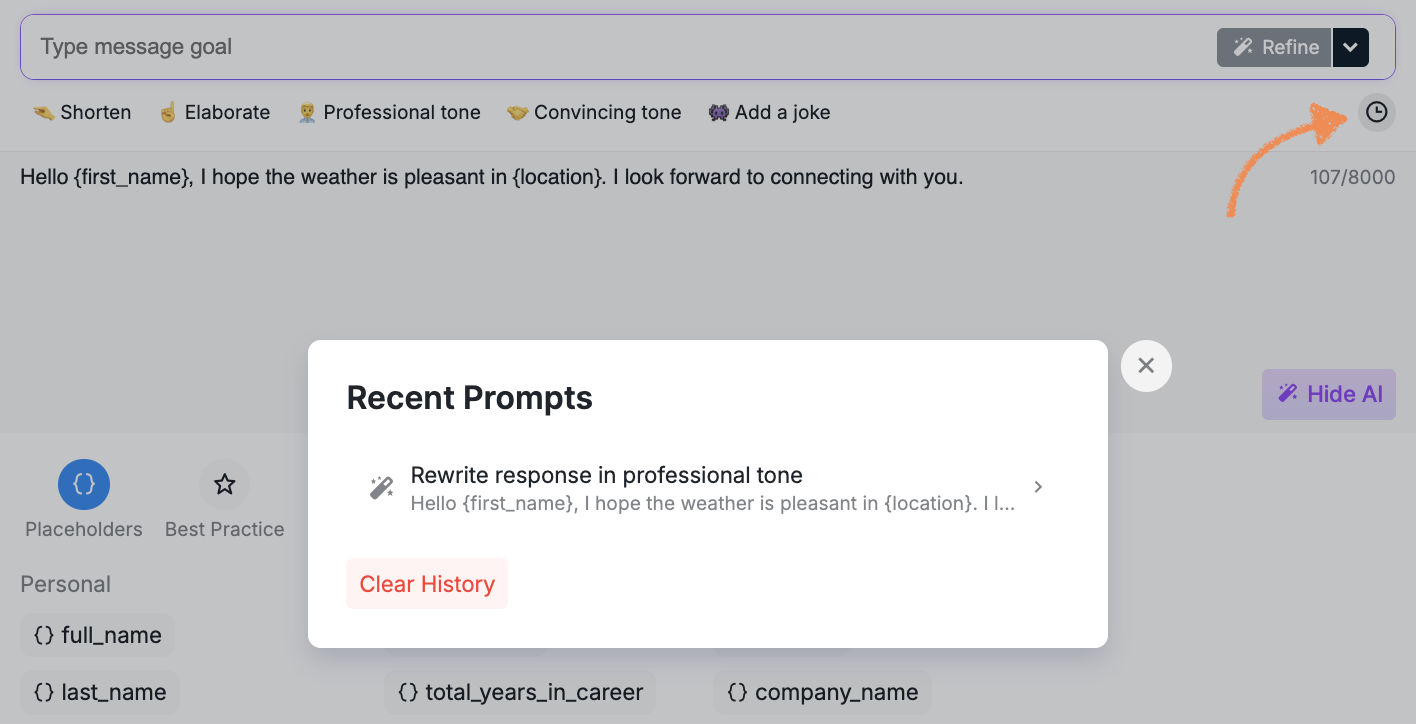
Your AI-generated message will be ready and waiting there once processing is complete.
Good to Know
Longer processing times do not mean your request failed
You don’t need to regenerate the message
All completed AI outputs are automatically saved in Recent Prompts
Learn More
For a deeper look at how the AI Content Assistant works and how to get the best results, check out the dedicated Help Center article.
If you still need help or have questions, our Customer Support team is always happy to assist.