Billing: How to Manage and Adjust Your Mailbox Slots
Last updated: July 31, 2026
If you have added mailboxes to your account and need to reduce or increase the number of the mailbox slots you're using, you can manage them directly through the Billing section. This article explains how to adjust the number of mailbox slots across your workspaces.
Note: Even members with purchase rights cannot delete domains or reduce the number of slots. Only Workspace Admins (and above) can do that.
To change the number of mailbox slots on your account, follow these steps:
Navigate to Billing in your dashboard.
Click on Add-ons.
Find the AI Mailbox Slots section and click Manage.
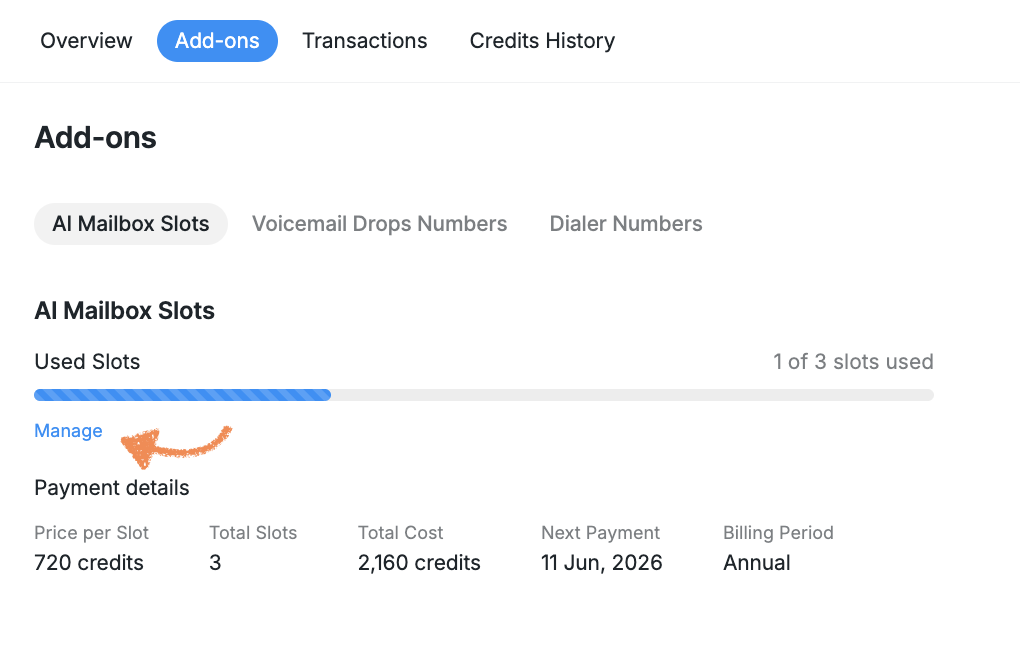
Adjust the number of slots as needed, then click Update.

Please note: Mailbox slot purchases and renewals are non-refundable.
If you reduce the number of mailbox slots in your subscription, you'll continue to have access to your current subscription until the end of your billing period, but you won't receive a refund or credit for the mailbox slots you no longer use.
If you believe you are owed сredits or refund for previously purchased mailbox slots, please reach out directly to your Success Manager for assistance.