AIES Billing: Member Guide
Last updated: May 13, 2026
This article explains how AI mailbox slots and domains work in your workspace, what you can do, and what to expect when payments fail.
What Are Slots and Domains?
Two paid components power AI Email Service (AIES) in your workspace:
AI Mailbox Slots — each slot enables one AI-powered mailbox. Slots are renewed automatically on a regular billing date.
Domains — custom sending domains that your workspace uses for outreach.
What You Can Do
By default, Workspace Members cannot purchase or renew domains or slots. Your Workspace Admin can grant you those rights.
If you have been given purchase rights, you can:
Buy new domains
Renew existing domains
Buy and renew additional mailbox slots
Note: Purchasing rights do not include the ability to delete domains or reduce the number of slots.
Only Workspace Admins can do that.
Buying a Domain
If you have purchase rights, you can buy a domain directly from the platform. Domains are registered for 1 year.
Domain pricing depends on how your workspace is set up (USD or credits):
USD: minimum $15 to purchase, minimum $20 to renew
Credits: minimum 380 credits to purchase, minimum 400 credits to renew
If a payment fails, you can:
Remove some domains from the order (if you selected more than one)
Retry the payment
Switch to a different payment method (if paying in USD)
Close the order
Note: Domain payments are non-refundable once the purchase is successful.
Auto-Renewal for Domains
Domains can be set to renew automatically. Here is what to expect:
If auto-renewal is turned on more than 45 days before the domain expires: the renewal charge runs automatically 45 days before expiry. If it fails, the system retries on a schedule, and you can also retry manually.
If auto-renewal is turned on 45 days or fewer before expiry: you are charged immediately when you enable it. If it fails, no automatic retries occur — you will need to retry manually from domain settings.
Find out more about domain auto-renewal in this article.
Buying Mailbox Slots
If you have purchase rights, you can also buy additional mailbox slots. Each slot costs $5 (or the credit equivalent set by your admin).
Slots follow your main subscription cycle — monthly or annual. When you buy mid-cycle, you are only charged for the remaining days until the next billing date.
Note: Slot charges are non-refundable.
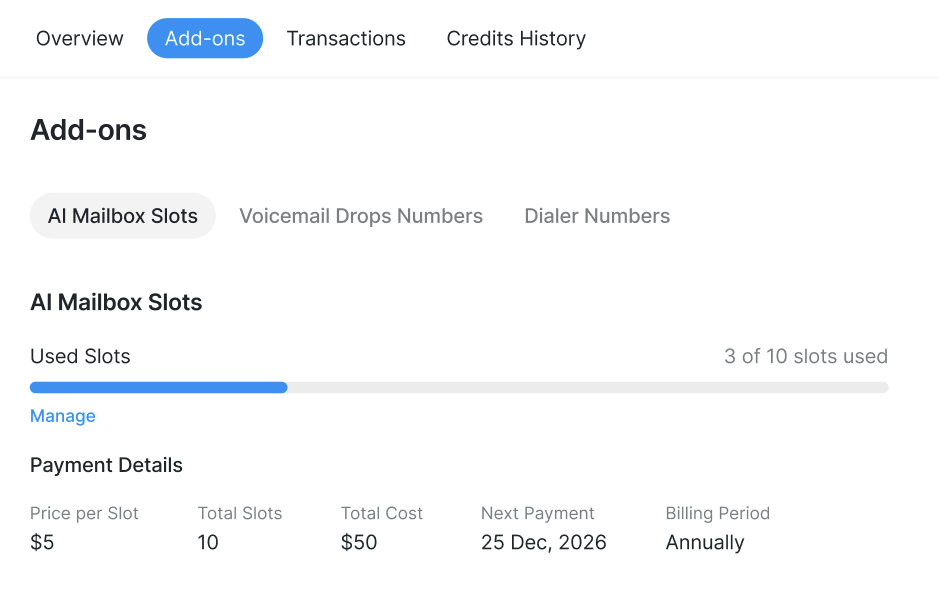
Viewing Slot Billing Info
In Workspace Settings > Billing, you can see:
How many slots your workspace is paying for
How much is being charged (USD or credits)
The next billing date
When Slot Renewal Fails
If your workspace's slot renewal payment fails, prospects assigned to AIES mailboxes move to Pending status with the reason: AI Mailbox Slots are unpaid.
Important: If slots remain unpaid for 28 days, the slots and associated mailboxes will be deleted.
Contact your Workspace Admin to resolve the payment.
If a Payment Fails
Here are the error messages you might see and what they mean: