Managing and Removing Blacklisted Prospects
Last updated: April 13, 2026
Sometimes you may need to adjust your blacklist by removing prospects or troubleshooting why certain prospects weren't blacklisted as expected. This article covers how to manage your blacklist effectively.
Why Isn't a Prospect in the Blacklist After I Blacklisted Them?
A prospect may not be added to the blacklist for the following reasons:
Insufficient Information – If the system doesn't have enough details about the prospect, it may not be able to apply the blacklist.
Mismatch in Blacklisted Word – The blacklist only applies to exact matches. For example, if you blacklist "Apple", a prospect with "Apple Inc." as their company name will not be blacklisted.
How to Remove Prospects from the Blacklist
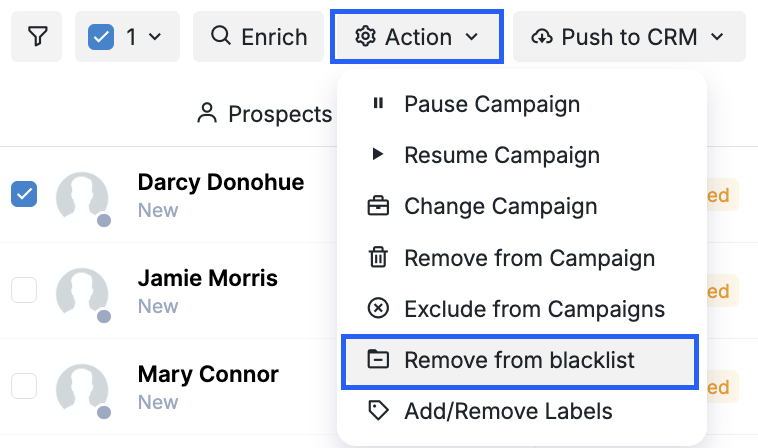
If you change your mind or mistakenly blacklist a prospect, you can always remove them from the list by:
Going to the Prospects tab.
Finding the prospect you want to remove.
Ticking the box next to their name.
Selecting Action > Remove from Blacklist.
Managing your blacklist is an ongoing process. By regularly reviewing and adjusting your criteria, you can ensure your campaigns stay focused on the right audience.
If you encounter any issues or need further assistance, feel free to contact us anytime.