Why can't I add a prospect from Search to an email-only campaign?
Last updated: June 5, 2026
If you're trying to add prospects from the Search tab to an email-only campaign and hitting a wall, you're in the right place. This is expected behavior — but there are a couple of easy ways to get your prospects where you need them.
Why this happens
Prospects found via the Search tab (our platform's database) can only be added to multichannel campaigns. Email-only campaigns are designed to work with prospects imported through specific methods.
Supported ways to add prospects to an email-only campaign
API request: Add prospects programmatically via API.
CSV upload: Import a list of prospects by uploading a CSV file to the campaign.
How to work around this
If you want to use prospects from the Search tab in an email-only campaign, there are two options:
Switch to a multichannel campaign
Change your campaign type from email-only to multichannel. Multichannel campaigns support Send Email steps alongside other outreach steps — so your email workflow stays intact. Once updated, you can add prospects directly from the Search tab.
Export prospects via a temporary multichannel campaign
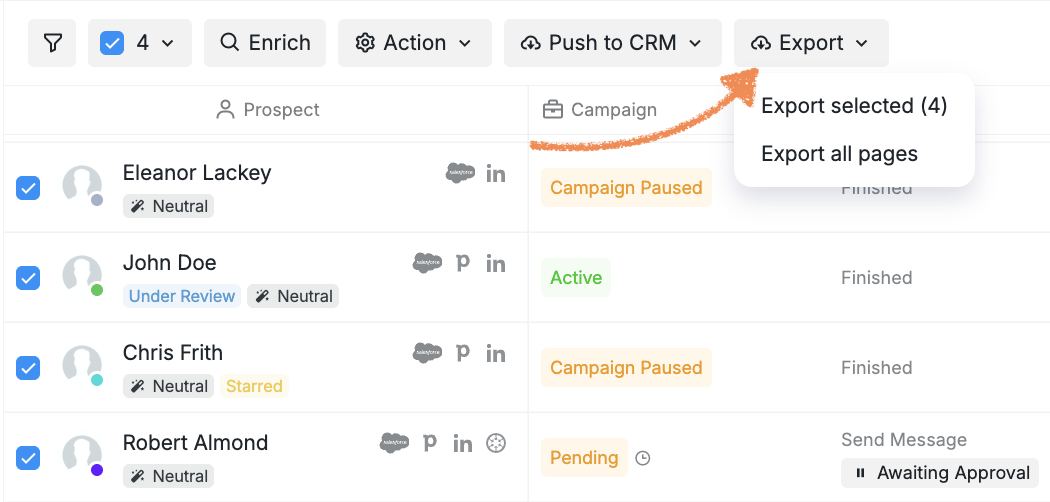
Create a separate multichannel campaign and add your Search tab prospects there. Then go to the Prospects tab, export them as a CSV file, and upload that CSV to your email-only campaign.
Still have questions? Reach out to our Customer Support team and we'll be happy to help.