Why Is My Prospect's Company or Job Title Outdated?
Last updated: June 12, 2026
If you've ever noticed that a prospect's company or job title doesn't look up to date, here's why that can happen and how to refresh their information.
Why Prospect Information May Be Outdated
When a prospect is added to a campaign, their profile information is captured at the time they are sourced.
If the prospect changes jobs, updates their title, or takes on additional roles after being added to your campaign, the information shown in their prospect card may no longer reflect their current position.
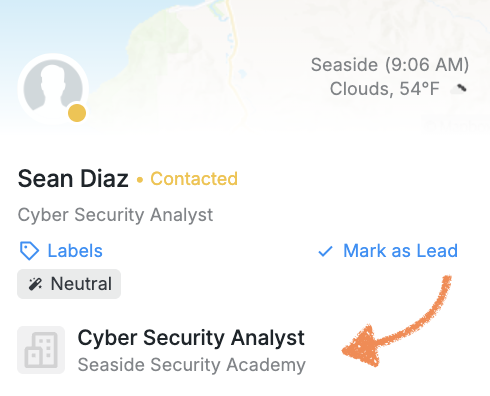
Prospect profile data is not automatically re-synced when changes are made on the Social Platform. The details displayed in your account are based on the information available when the prospect was first added.
How to Refresh Prospect Information
To update a prospect's profile details, the campaign must reach a Perform Action step with View Profile selected as the action.
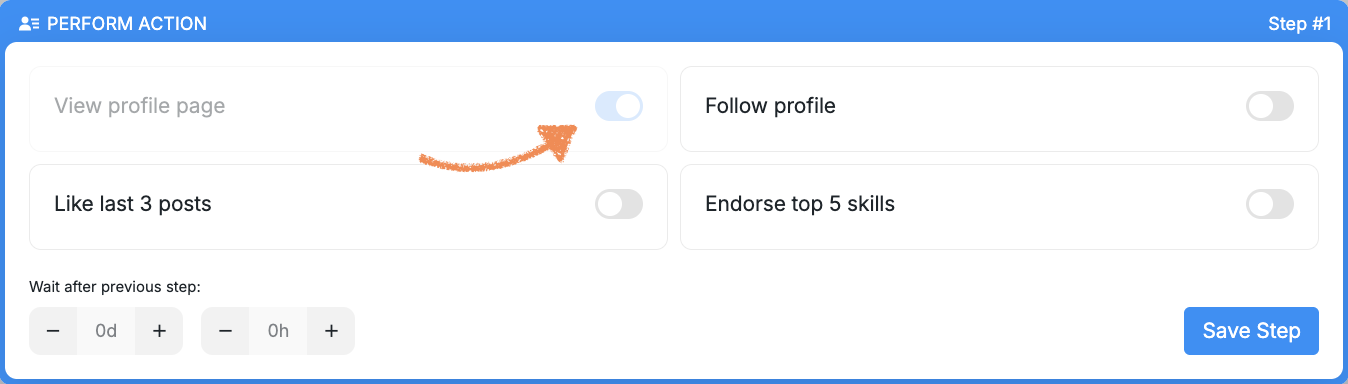
Once the View Profile action is completed, the system retrieves the latest information from the prospect's profile and updates their details in your account.
Recommended Campaign Setup
To ensure prospect information is up to date before any messages are sent, we recommend adding a Perform Action step with View Profile in your campaign.
This allows the system to refresh the prospect's profile information, including their current company and job title, before any outreach begins.
Best Practice: Use One Action Per Perform Action Step
A Perform Action step can include multiple actions, such as:
View Profile
Like Last 3 Posts
Follow Profile
Endorse 5 Skills
However, combining multiple actions in a single step can slow down campaign processing because each action is completed one at a time.
For the best performance, we recommend using a single action per Perform Action step and placing additional actions in separate steps later in the campaign.
Prospects With Multiple Current Roles
Some prospects may hold multiple positions at the same time.
When a prospect is initially sourced, the system stores the profile information available at that moment. Running a View Profile action later in the campaign helps refresh their profile and ensures the most current role information is reflected whenever possible.